Showing posts with label advance windows password. Show all posts

Saturday, 5 October 2013

Lost Windows XP password. How to login and start computer?

If you find yourself locked out of your Windows XP because you forgot or lost  login password, below are some things you can do.
  • First, do you have the administrator password? Login as an admin and change the password of your user ID. (Obvious Adams?)
  • NEW: If you are an Administrator user, and are logged into Windows right now because your PC is setup to log you in automatically, but have forgotten your password in fact, and would now like to change it — well, Windows requires you to know the old one. However, there is a brute force way to change your Administrator password. Open a Command prompt (START — > RUN — > then type “cmd” without the double quotes) and then type the following command: net user username newpassword
    Remember, if the username has spaces in it, then enclose it in double quotes, e.g.,
    net user “Samuel Jackson” pulpypass
    This would change Samuel Jackson’s password to pulpypass provided Samuel Jackson was an Administrator user.
  • Don’t have admin access? Well, you can get it if you wish by downloading a cool tool from Password Seeker to recover Windows password if you have forgotten it.
  • Or, you could just download this program to reset Windows XP / 2000 / NT security if the Administrator password, secure boot password, or the key disk is lost.
  • Windows Password Recovery Tool 3.0 can replace the administrator password of a Windows XP, Windows NT or Windows 2000 system by rebooting the computer with a special set of boot disks or CD-ROM (or usb flash drive). This is useful if you forgot the administrator password and cannot access the Windows XP/2000/NT system.
  • SmartDoctor has put together an Password Recovery Bundle, which can recover many types password included Windows systems.
CAUTION: Please use these tools at your own risk. I believe they are good ones, with good intent, but they should be used only if you know what you are doing.
Let me know how it goes.

Thursday, 25 February 2010

How do I stop Windows screensaver asking for password?

Question:
Okay, I have one - I want to know if there's a way to change the time for the login screens to show up in Windows XP Pro? When I walk away from my computer, I come back to find out that I have to log in again. I really don't need my machine to time out like that because I am the only one that is using it. I do have a screen saver set up to go on after about 15 minutes but it's annoying to have to log in each time I come back to the computer.
Answers:
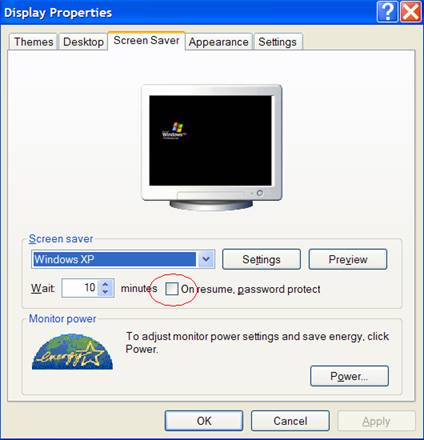
What you're seeing is the screensaver password protect feature of Windows XP. To disable this, you need to get into the Display Properties screen. There are (at least) two ways to get there. Right click on an open area of your desktop and click Properties, or go into Control Panel and double click Display.
Go to the Screen Saver tab, and uncheck the "On resume, password protect" box (you'll see it circled in the screenshot below). To leave the password protection but extend the time before a password is required, increase the minutes in the "Wait" box on that tab and leave the password protect box checked.
windows xp screensaver configuration
Before disabling it, be mindful of the potential consequences. Under certain circumstances the security provided by this inconvenience should be considered benefit enough to cope with it. This prevents anyone from walking up to your computer and having access to all of your data. If this is a home PC, that might not be of any concern. In small business environments where data is shared amongst everyone anyway, it's also probably not of much concern other than for certain staff that have access to data like payroll that is confidential.
Another thing to keep in mind is if this is a computer in a business with a server, chances are pretty good it's in a Microsoft Active Directory domain. At a very basic level, Active Directory puts all computers at a business within an organizational structure that centralizes resources and authentication (verifying your username and password), affording greater security, flexibility and control. One feature of Active Directory is the use of Group Policies which allow
administrators to define what users can and cannot do with their machines, including mandatory configuration settings.
It's possible to configure Group Policies so users cannot modify screen saver settings, including the time to wait before activating the screensaver and if users can disable password protection. Under these circumstances, even if you can disable the password protection it may get enabled again, and there isn't anything you can do about it (unless you're the server administrator). Also in a business environment, be mindful of any company policies that require password protected screen savers, even if it's not mandated through Group
Policy or similar technical controls.
In another case, you might forget the windows login password, then you can find some password recovery tools to remove windows password.

Monday, 22 February 2010

Lost Windows XP password. How to login and start computer?

If you find yourself locked out of your Windows XP because you forgot or lost  login password, below are some things you can do.
  • First, do you have the administrator password? Login as an admin and change the password of your user ID. (Obvious Adams?)
  • NEW: If you are an Administrator user, and are logged into Windows right now because your PC is setup to log you in automatically, but have forgotten your password in fact, and would now like to change it — well, Windows requires you to know the old one. However, there is a brute force way to change your Administrator password. Open a Command prompt (START — > RUN — > then type “cmd” without the double quotes) and then type the following command: net user username newpassword
    Remember, if the username has spaces in it, then enclose it in double quotes, e.g.,
    net user “Samuel Jackson” pulpypass
    This would change Samuel Jackson’s password to pulpypass provided Samuel Jackson was an Administrator user.
  • Don’t have admin access? Well, you can get it if you wish by downloading a cool tool from Password Seeker to recover Windows password if you have forgotten it.
  • Or, you could just download this program to reset Windows XP / 2000 / NT security if the Administrator password, secure boot password, or the key disk is lost.
  • Windows Password Recovery Tool 3.0 can replace the administrator password of a Windows XP, Windows NT or Windows 2000 system by rebooting the computer with a special set of boot disks or CD-ROM (or usb flash drive). This is useful if you forgot the administrator password and cannot access the Windows XP/2000/NT system.
  • SmartDoctor has put together an Password Recovery Bundle, which can recover many types password included Windows systems.
CAUTION: Please use these tools at your own risk. I believe they are good ones, with good intent, but they should be used only if you know what you are doing.
Let me know how it goes.

Monday, 7 December 2009

How To bypass windows Password with a USB Flash Drive


Last week when my friend bought a Windows XP installed netbook, he created a complex Windows login password to bolster the privacy of his netbook. Unfortunately, he couldn't remember the spelling of his own password the next day and was unable to use his netbook. I suggested Windows Password Key 8.0 to reset the password and start using his netbook again. Let’s find out more about Windows Password Key 8.0.
Windows Password Key 8.0 is a useful application, which can be used to reset the Windows login password on your netbook with the help of USB flash drive. Windows Password Key 8.0 is compatible with all versions of Windows.

Windows Password Key 8.0


However, your netbook must have minimum system requirements to enable Windows Password Key 8.0 to reset your Windows login password. First, your  Windows must be installed in a FAT-16, FAT-32 or NTFS partition and you must also have bootable USB flash drive to reset the password.
You'll need to install Windows Password Key 8.0 on any other Windows PC, which is accesible to you. Once the installation is complete, Windows Password Key 8.0 will launch on the screen.
In the Windows Password Key 8.0 window, you'll need to select the existing Windows Password Key 8.0 image, which is ideally located as a  default option under ‘Choose the existing windows password key 8.0’.
Windows Password Key 8.0

Select the option ‘USB Flash Drive’ and insert your USB flash drive in the USB port. After you insert the USB flash drive, select it from the drop down list and click the ‘Burn’ button.
Select The USB Flash Drive
When the ‘burning’ process starts, Windows Password Key 8.0 extracts the ISO image and  copies the necessary Windows files to your USB flash drive.
Start burn windows password key 8.0 to usb flash
Now you can insert your newly created USB flash drive  into  your netbook port, and then reboot your operating system. Be sure to change your netbook set up to make it boot from your USB flash drive.
When your operating system boots from your USB flash drive, the Windows Password Key 8.0 will initialize on your netbook screen. You need to select ‘Windows installation to be processed’ and then select the user, whose password you need to reset by typing the number associated with it, followed by the ‘ENTER’ key.
Remove windows password
Hack Windows Password
In the next screen, type ‘Y’ followed by ‘ENTER’ to reset a new password.
Crack Windows Password Recover
After you reset a new password, remove the Windows Password Key 8.0 bootable USB flash drive and restart your netbook to log in using your new password.
delete Windows Password
It is always a good practice to set up a simple password for our windows login. Although we have utility applications like Windows Password Key 8.0 for our rescue, it becomes a tedious task to reset password, especially when you are travelling with important documents on your netbook.